
Bagaimana cara membuat kontak form 2 kolom seperti gambar dibawah ini:
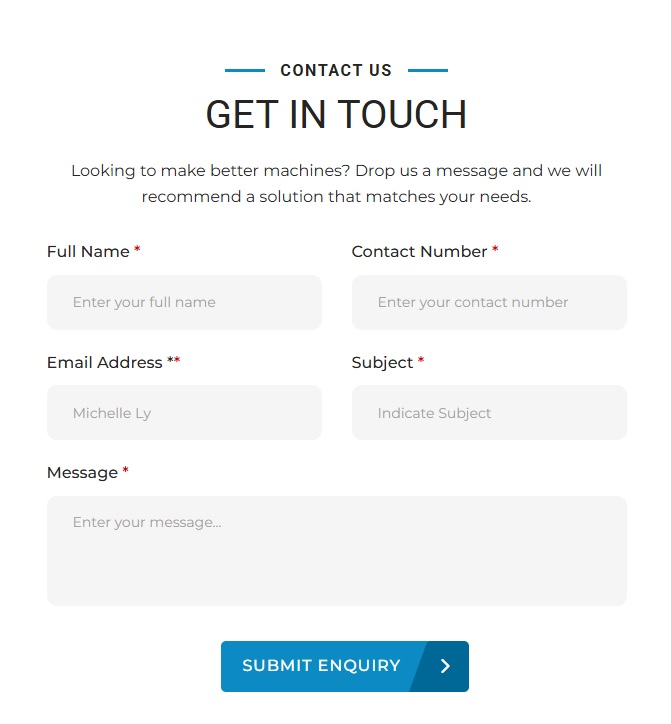
Plugin wordpress yang harus diaktifkan adalah Contact Form 7
1. Isi tab “Form” Contact Form 7
Pada plugin contact form 7 Isi kode berikut di menu form:
<div class=”contact-form”>
<div class=”cf7-row”>
<div class=”cf7-col”>
<label>Full Name <span>*</span></label>
[text* your-name autocomplete:name placeholder “Enter your full name”]
</div><div class=”cf7-col”>
<label>Contact Number <span>*</span></label>
[tel* your-phone placeholder “Enter your contact number”]
</div></div>
<div class=”cf7-row”>
<div class=”cf7-col”>
<label>Email Address <span>*</span></label>
[email* your-email autocomplete:email placeholder “Michelle Ly”]
</div><div class=”cf7-col”>
<label>Subject <span>*</span></label>
[text* your-subject placeholder “Indicate Subject”]
</div></div>
<div class=”cf7-message”>
<label>Message <span>*</span></label>
[textarea* your-message placeholder “Enter your message…”]
</div><div class=”cf7-submit”>
[submit “SUBMIT ENQUIRY”]
<span class=”submit-arrow”>›</span>
</div></div>
Catatan
Pada kode:
- Full Name → wajib
- Contact Number → wajib
- Email Address → wajib
- Subject → wajib
- Message → wajib
Jadi saya menggunakan * pada semua field.
2. Tambahkan CSS
Masih di dashboard web wordpress anda, Masuk ke:
Appearance → Customize → Additional CSS
kemudian masukkan kode CSS berikut:
/* =========================
CONTACT FORM 7
========================= */.contact-form {
width: 100%;
max-width: 100%;
font-family: Montserrat, Arial, sans-serif;
}/* ROW */
.cf7-row {
display: flex;
gap: 30px;
margin-bottom: 22px;
}/* COLUMN */
.cf7-col {
width: 50%;
}/* LABEL */
.contact-form label {
display: block;
font-size: 16px;
font-weight: 400;
color: #111111;
margin-bottom: 12px;
}.contact-form label span {
color: #e00000;
font-weight: 500;
}/* INPUT */
.contact-form input[type=”text”],
.contact-form input[type=”email”],
.contact-form input[type=”tel”],
.contact-form textarea {
width: 100%;
box-sizing: border-box;
border: none;
outline: none;
background: #f3f3f3;
border-radius: 10px;
padding: 0 26px;
font-family: Montserrat, Arial, sans-serif;
font-size: 14px;
color: #333333;
}/* TEXT INPUT */
.contact-form input[type=”text”],
.contact-form input[type=”email”],
.contact-form input[type=”tel”] {
height: 55px;
}/* TEXTAREA */
.contact-form textarea {
height: 110px;
padding-top: 20px;
padding-bottom: 20px;
resize: vertical;
}/* PLACEHOLDER */
.contact-form input::placeholder,
.contact-form textarea::placeholder {
color: #999999;
opacity: 1;
}/* MESSAGE */
.cf7-message {
width: 100%;
margin-bottom: 35px;
}/* SUBMIT */
.cf7-submit {
position: relative;
width: 248px;
height: 51px;
margin: 0 auto;
}/* BUTTON */
.cf7-submit input[type=”submit”] {
width: 248px;
height: 51px;
border: none;
border-radius: 5px;
background: #0788bd;
color: #ffffff;
font-family: Montserrat, Arial, sans-serif;
font-size: 16px;
font-weight: 500;
letter-spacing: 1px;
cursor: pointer;
padding: 0 45px 0 10px;
transition: 0.3s;
}/* HOVER */
.cf7-submit input[type=”submit”]:hover {
background: #087ca9;
}/* ARROW */
.submit-arrow {
position: absolute;
right: 0;
top: 0;
width: 45px;
height: 51px;
display: flex;
align-items: center;
justify-content: center;
color: #ffffff;
font-size: 34px;
line-height: 1;
pointer-events: none;
}/* ERROR */
.contact-form .wpcf7-not-valid-tip {
font-size: 12px;
margin-top: 5px;
color: #d00000;
}/* MOBILE */
@media (max-width: 767px) {
.cf7-row {
display: block;
margin-bottom: 0;
}.cf7-col {
width: 100%;
margin-bottom: 22px;
}.cf7-message {
margin-bottom: 30px;
}.cf7-submit {
margin-left: 0;
margin-right: 0;
}}
Selamat mencoba!


